Exporting Captured Infringements (CSV Format)
Within the SERP Tracker, you can export captured infringements as a CSV file, which provides valuable data for insight and analysis. Below is a breakdown of each column and what it represents:
- Rule Name: The custom name you assigned to the rule when it was created.
- Infringement ID: A unique internal Adthena ID for the specific ad, tied to the date and time it was captured.
- Date: The date on which Adthena detected and recorded the infringement.
- Time: The exact time the infringement was captured.
- Search Term: The Google search query that triggered the ad associated with the infringement.
-
Position: Indicates the ad’s paid placement on the search results page:
- ‘T’ = Top of the page (above organic results)
- ‘R’ = Right-hand side (Bing only)
- ‘B’ = Bottom of the page
- Competitor: The domain (e.g., adthena.com) of the advertiser responsible for the infringing ad.
- Title: The headline or main title text of the captured ad.
- Description: The first line of ad copy beneath the title.
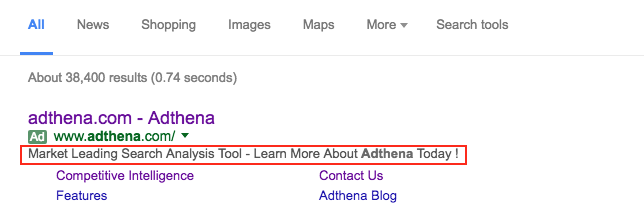
- Display URL: The visible URL shown in the ad, typically representing the advertiser’s website.
- Destination URL: The actual landing page users are directed to when clicking the ad.
- Ad Click URL: The full Google Search URL where the ad was captured. This can be submitted as evidence in an appeal to Google. It may show a 404 error if visited directly—only Google can view this URL.
- Evidence Link: Opens the Adthena platform to display a screenshot of the ad as it appeared in Google search results. It includes the date, timestamp (converted to your local time), and an export option.
- Ad ID: The unique identifier assigned to a specific advert.